
PDF Editor
by Leon Becker
Edit PDFs without changing the original
About
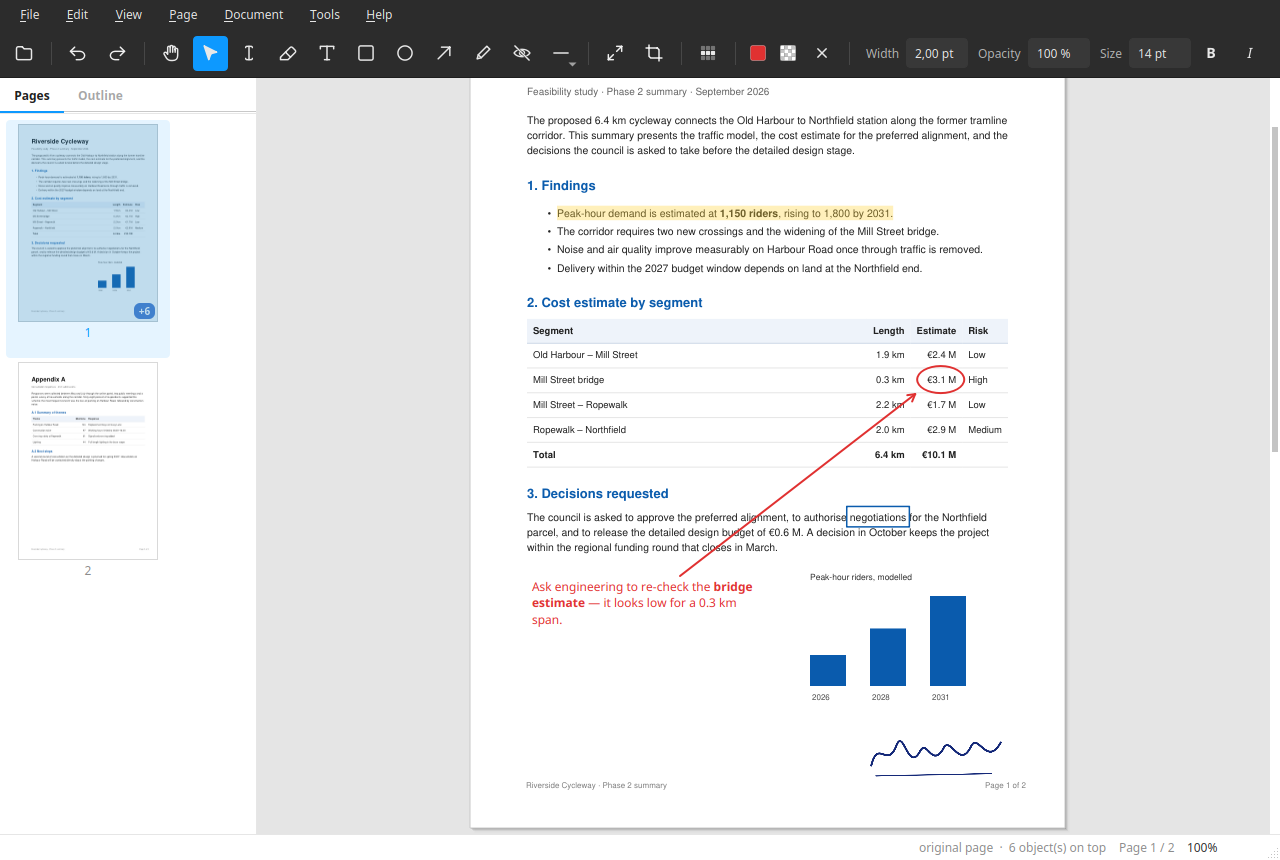
PDF Editor annotates, rearranges and redacts PDFs without ever writing to the file you opened. Your edits are kept in a small file beside the document and replayed each time you open it, so the original stays byte-for-byte intact. When you are ready, you export a new PDF. That makes it safe to mark up a contract, sign a form or black out a bank statement without the usual worry that a save will overwrite something you cannot get back. It also means you can undo a decision you made last week: the edits are data, not baked pixels, until you export. What you can do: - Read and search PDFs, follow links, select and copy text - Reorder, rotate, duplicate and delete pages; insert blank pages, images, or pages from another PDF - Add notes, boxes, arrows, freehand drawing and text highlights, and move or resize them afterwards - Place images — a signature, a stamp, a screenshot — and crop them without losing what you cropped away - Redact for real: painted-over areas are replaced in the exported file, not covered with a black rectangle a reader can move aside - Export a page range, or split a document into numbered files Text you add is set in the same font the exported PDF uses, laid out the same way, so what you see on screen is what the export contains — including symbols and monochrome emoji, which stay searchable in the finished file. What it does not do: retype the text already in the PDF. PDF Editor adds to a page and rearranges pages; it does not rewrite the existing content. To change wording, cover it and type a note on top, or redact it. Redacting turns that page into an image, so the rest of the page's text stops being selectable and its links stop working. That is the trade that makes the covered content genuinely gone rather than hidden behind a box. Good to know: the file holding your edits lives next to the PDF, so it does not travel with the document if you email it — export first. Your original PDF is never modified, so it still holds whatever you painted over. For a page you made from an image, your edits file holds it too, and for a page you inserted from another PDF it stays in that PDF. Send the export, and treat every file it was built from as you would the original. The edits file also keeps the full image behind every crop. OCR is not available in the Flatpak build, because it needs a tool from outside the sandbox.
Permissions
2 permissions weaken the sandbox. Flatsonar asks before installing.
- full access to your home folder
--filesystem=home - sets PYTHONPATH: changes which libraries or plugins get loaded
--env=PYTHONPATH=/app/lib/python3.13/site-packages - inter-process communication (needed for X11)
--share=ipc - Wayland display
--socket=wayland - X11 display, only when Wayland is unavailable
--socket=fallback-x11 - printing
--socket=cups - GPU acceleration
--device=dri - access to /run/media
--filesystem=/run/media - access to /media
--filesystem=/media - access to /mnt
--filesystem=/mnt - access to xdg-run/gvfs
--filesystem=xdg-run/gvfs:ro
Who publishes this
The creator demonstrably controls this app id: Flathub verification, the hosting account owns the namespace, or a well-known file on their domain.
- repository is 10 day(s) old with 0 star(s): no track record yet
publisher:new-repo - hosted by github.com/beleon, which owns the io.github namespace of io.github.beleon.pdfed
publisher:namespace
Maintenance
Recent activity on the upstream repository, or built and reviewed by Flathub.
No staleness signals: recent activity, or built and reviewed by Flathub.